Timing multiple dishes to minimize cooking time
Every dish's steps are woven into one schedule, solved so the whole meal is ready on time and takes as little time as possible to cook.
Every dish's steps are woven into one schedule, optimized so you spend less time in the kitchen and more time at the table. The schedule is generated behind the scenes, using a custom solver, so you never have to worry about timing multiple recipes. To speed cooking up further, friends and family can help, and Mise en Party splits the steps between everyone in the kitchen.
The timing bar on the meal page

The schedule is summarized at the top of the meal page with a single timeline. The bar runs from the start time on the left to the serve time on the right, with the meal's hands-on and total times above it. Active hands-on cooking, active prep, and passive waiting are designated by red, purple, and blue bars respectively.
The full schedule
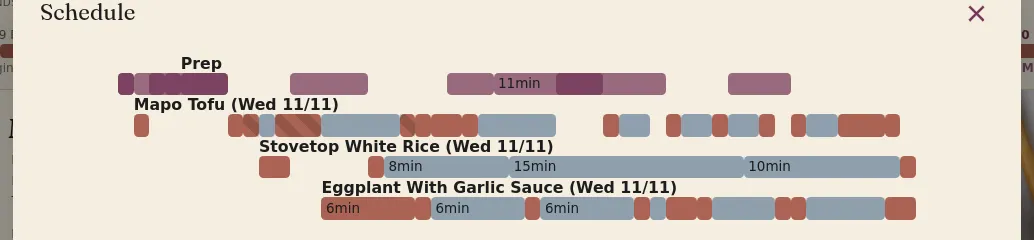
An expanded view of the schedule can be seen by clicking the Show Schedule button on the meal page; this view breaks out each recipe into its own row. An ingredient used multiple times in the meal is prepped once, as shared prep, on its own Prep row.
How the schedule is solved
The schedule is solved using a constraint programming solver, not an LLM, to ensure each meal is consistent and robust, free from hallucinated steps and forgotten ingredients. The solver makes sure that ingredients and sub-recipes are prepared before they are needed, and that no two steps need the same burner or pot at once, all while minimizing how long it takes to cook the meal.
Ready on time
When a meal is planned for a certain time, e.g. Dinner for 7:00 PM, Mise en Party aims to have every recipe done as close to 7:00 PM as possible. Depending on the number of chefs in the kitchen, this isn't always possible, so it minimizes how long finished recipes sit before serving.
Adding more chefs
Adding multiple chefs when cooking together greatly reduces how long it takes to cook a meal, as each chef adds another pair of hands to chop, stir, and rinse. Certain steps, like letting bread rise, don't benefit from extra chefs. But, in general, adding chefs makes it more likely that the recipes will all be done at the same time.
Questions
Can I change the serve time mid-cook? Not for a session already under way. You can speed up or slow down, which will marginally affect the final serve time, but once the bread is in the oven, you can't really change when it comes out.
What if a step takes longer than planned? Mise en Party has some built-in slack to accommodate this, but in general you'll just serve slightly after the set time. The expected serve time, Est. Serve Time, is shown on the bottom right of the cooking pages.
Does it account for the oven preheat? Yes, Mise en Party automatically accounts for oven preheats.