Meals and courses: plan a meal, not a recipe
Mise en Party weaves every dish in a meal into one cooking order, with courses for dishes served at different times.
A fully optimized meal consists of all the dishes you want to cook together. Any two (or more!) recipes can be selected, and they will be automatically interwoven into a single set of instructions for you to follow. A day can hold several meals, and each meal can be split into courses that are served at their own times.
A single recipe for the whole meal
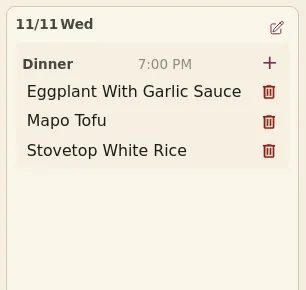
Unlike other meal planning services, Mise en Party weaves the steps from every recipe in your meal into a single set of directions: no more bouncing between tabs and losing your place. This allows Mise en Party's scheduler to ensure each recipe finishes at the same time. By having you chop ingredients for one dish while another simmers, Mise en Party minimizes how long the entire meal takes to cook. Even if you're cooking just one dish, its steps are still scheduled so you prep the next ingredients while the water comes to a boil or the oven preheats.

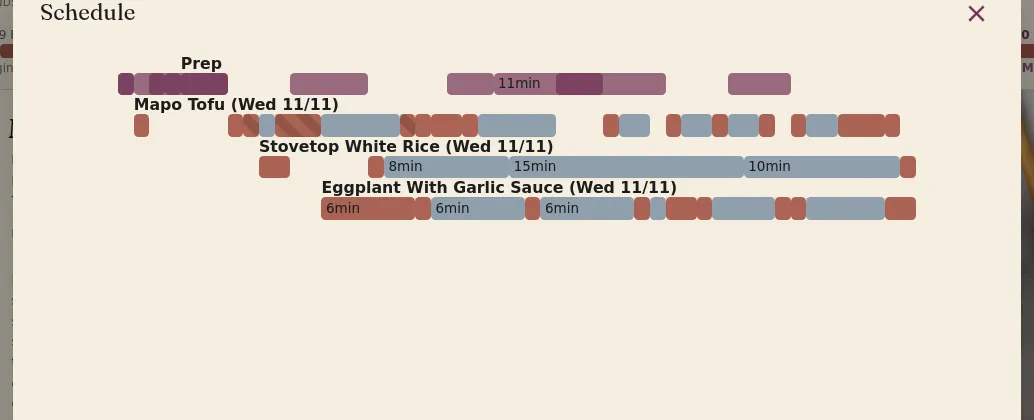
Mise en Party's schedule also accommodates multiple chefs and works around the tools available in your kitchen. Additionally, if an ingredient like onions or garlic shows up in more than one recipe, or in more than one step, it is automatically pulled out into a single prep step so you do the chopping just once.
Meals, courses and serve times
A day can hold several meals, such as breakfast, lunch, and dinner. Meals on the same day are served at different times and cooked separately. Only a whole recipe made for both, like a sauce or stock, is shared between them. If chopped prep were shared too, you might chop some garlic alongside a breakfast omelette and it would sit out all day until dinner.
Every meal has at least one course and can be split into more, each with its own serve time, such as appetizers finishing 30 minutes before the main. The dishes in each course finish at the same time, while still being able to share prep work with all recipes in the meal. Most of the time a single course will be sufficient.
Planning across days
Days in your plan connect in two ways. If the same recipe shows up on more than one day, or at two meals on the same day, it is made once in a batch and then leftovers carry over within the shelf life of the dish. To cook one of those dishes fresh on a given day instead, click change ▾ on its card's cook-day line on that meal's page and choose Cook it fresh; only that day's dish changes. Work for a later meal, like an overnight dough, is made ahead during a meal you're already cooking, saving you a kitchen session.
How to set up a day's meals and courses
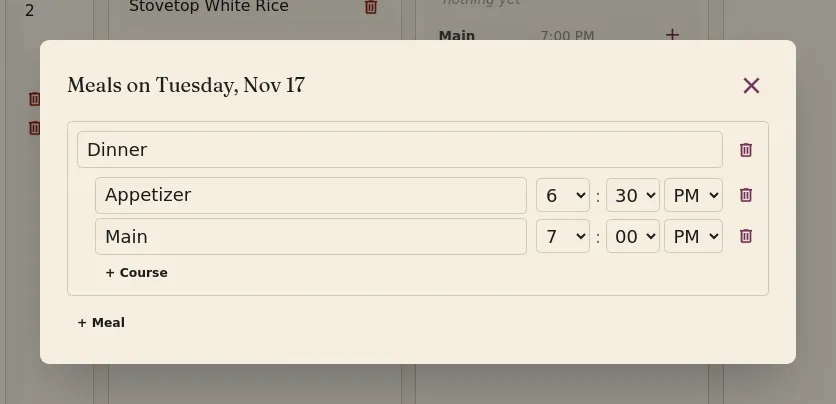
- Click the button on the top right of the day card on the home page, or Edit meal on the meal page.
- To add a meal, click + Meal, type its name and click Add. Each new meal starts with a Main course.
- To add a course, click + Course under the meal, type its name, pick a serve time and click Add.
- Change a meal's name, or a course's name and serve time, in place; changes save as you make them. The trash icon removes a meal or course.
- To add a dish to a specific course, click the + next to that course on the day card, or drag a recipe card onto the course. The button on a recipe card also adds it to your plan.
Questions
Can I plan a single dish? Yes! Mise en Party also optimizes the steps within a single recipe, making your standard recipes that much faster.
Can I plan a recipe that is not in the library? Yes. Use the recipe importer for your own creation or one from another site, then add it to your meal plan like any other recipe.